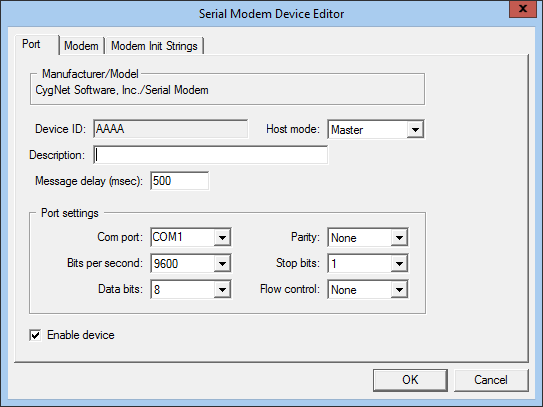
The Serial Modem EIE provides an interface to serial modems. Each modem can poll multiple remote devices.
Click the following image to see an example Device Editor:
For information about overriding communication device settings from the remote device, see Overriding Communication Settings.
A 64-bit version of this EIE is available. See 64-bit Device Drivers.
Serial Modem communication devices have three property pages: Port, Modem, and Modem Init Strings.
The Port properties specify the hardware connection The Modem properties specify the configuration parameters of the modem. Modem Init Strings are the initialization strings for the modem. One init string is designated as the default.
If you have three modems connected to the host, you would have three Serial Modem communication devices in the DDS, one for each modem. Many of the Modem properties can be specified at the remote device level including the initialization string and the remote modem phone number.
The following table lists and describes properties from the Port page of the Serial Modem Device Editor dialog box.
| Property | Description |
|---|---|
|
Device ID |
The unique identifier of an instance for this device. This free-form name must be unique in the DDS and the FAC. That is, it must be a name not used by any other communication device, import/export device, remote device, or facility. Valid characters are A-Z, 0-9, dash (-), underscore (_), and tilde (~). No spaces are allowed. 20 character maximum. Note: Tilde (~) is a valid character for both devices and facilities, but its use is not recommended. |
|
Description |
A free-form description of the device. 32 character maximum. |
|
Message delay (msec) |
The delay (in milliseconds) to wait before sending a message to the remote device. If the remote device also has a message delay, the greater value takes precedence. |
|
Host mode |
Master This default mode allows any message to be sent. NonMaster This mode is remote device EIE-specific. It is not designed to allow write messages to be sent to an RTU. However, because each remote device EIE specifies what a write message is, you might still be able to send some write messages. |
| Port settings | |
|
COM port |
The port to which the communications device is connected. You can type a port number in the box if necessary. The CygNet Universal Interface Service (UIS) takes control of the communication ports for which Comm Devices are defined and enabled. To release the port you must disable the communications device or stop the UIS. |
|
Bits per second |
COM Port bit speed. The port speed and device speed must match. |
|
Data bits |
Number of data bits. |
|
Parity |
Parity type. |
|
Stop bits |
Number of stop bits. |
|
Flow control |
Handshake signal. |
|
Enable device |
Check to enable or disable the device. The default setting is disabled. The device will automatically disable if an invalid configuration is detected. The device can be re-enabled after the invalid configuration is fixed. |
The following table lists and describes properties from the Modem page of the Serial Modem Device Editor dialog box.
| Property | Description |
|---|---|
|
Default phone number* |
The phone number that the modem will dial. |
|
Dialing prefix |
Dial prefix. |
|
Modem resp timeout (msec) |
Time (in milliseconds) to wait for a response from the modem. |
|
Init after hangup |
Flag to enable sending of init string after hang-up. |
|
Init before dial |
Flag to enable sending of init string before dial. |
| Connection control | |
|
Wait for connect time (sec)* |
Time (in seconds) to wait after dialing before connection. |
|
Connection retries* |
Number of retries before marking connection as failed. |
|
Dedicated line |
Flag to maintain a connection. |
|
Minimum disconnected time |
The minimum number of seconds for the communication device to wait after a modem hangup before trying to establish a new connection. |
| Auto answer | |
|
Enable auto answer |
Flag to allow modem to accept an incoming call. |
|
Max call duration (sec) |
Maximum time (in seconds) for an incoming call. |
|
Process on inbound connection |
Flag to allow modem to process an incoming call. |
| Pulse DTR | |
|
Pulse before modem commands |
Flag to send a pulse before modem commands. |
|
Pulse duration (msec) |
Time (in milliseconds) of the pulse. |
| Disconnect | |
|
Hang up after messages* |
Flag to hang-up once queue is empty. |
|
Min connect time (sec)* |
Time (in seconds) to wait before going to next field device in the queue. |
|
Disconnect if idle (sec)* |
Time (in seconds) to wait before disconnecting once queue is empty. |
|
Disconnect string |
String to send on disconnect. |
|
Hang up on new remote |
Hang up the connection to dial the new field device, even if the field device uses the same phone number. |
| Max dial out duration | |
|
Enforce max duration |
Flag to enable max call duration. |
|
Max call duration (sec) |
Maximum time (in seconds) of the outgoing call. |
* Property can be overridden on a per remote device basis.
This page contains the modem initialization strings. The default string is named InitString1 and its setting is: AT&F0E0V1&D2&C1&B1. (Consult your modem documentation initialization string options.)
You can create one or more initialization strings. For each remote device that uses the communications device, you can select which initialization string to use. Any initialization string can be set to the default.
To Add/Edit an Init String
To Set an Init String as the Default

|
|
|

